




简介
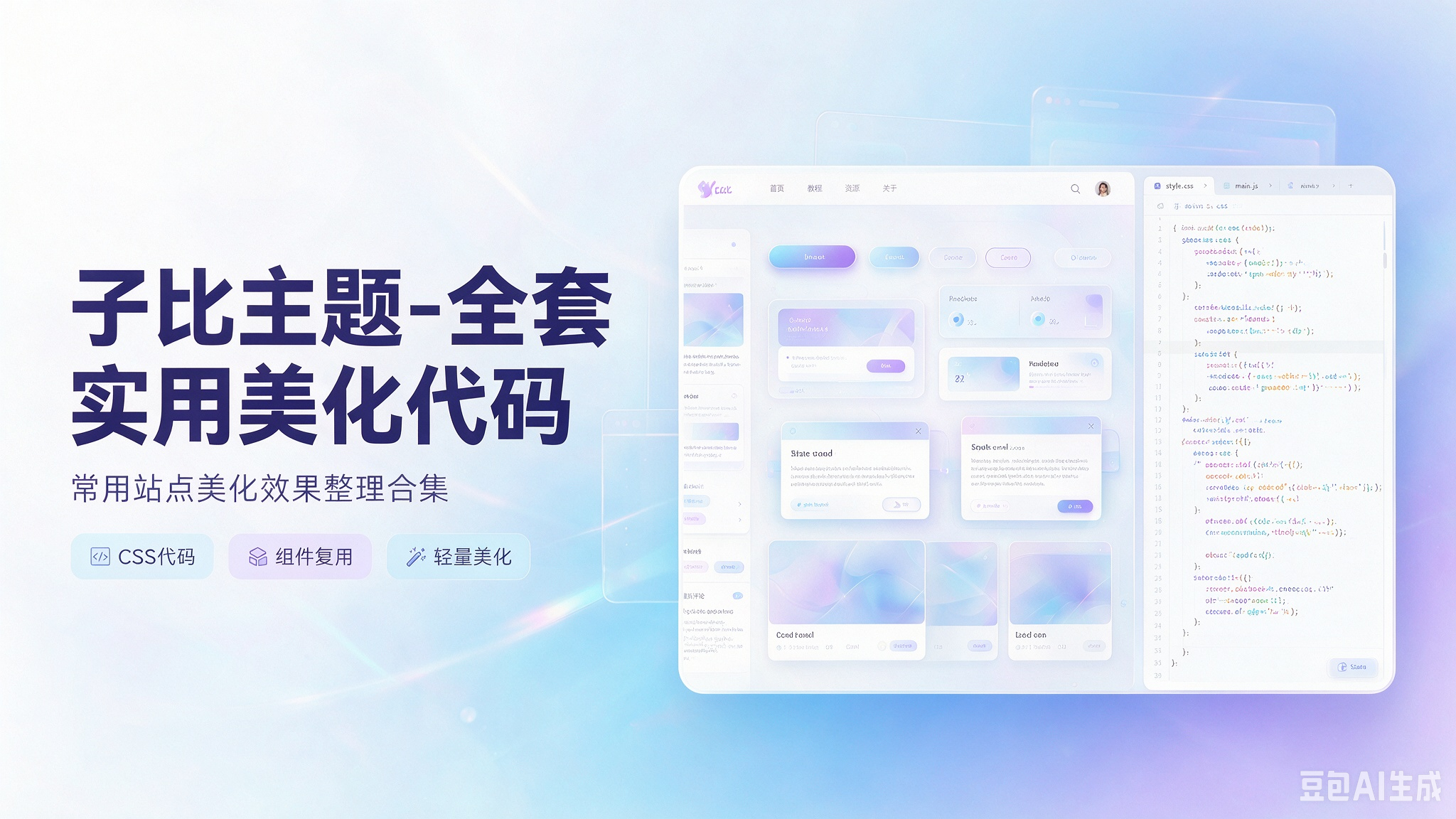
本合集针对WordPress 子比主题整理海量纯代码美化方案,无需额外插件,涵盖界面样式、图标、布局、按钮、弹窗、列表、滚动、角标、侧边栏、评论区、移动端适配等常用美化功能。代码轻量兼容主流子比版本,可按需单独启用 / 关闭,上手简单,一键粘贴即可改造站点视觉效果,兼顾颜值与访问性能。
代码部署
通用部署规则(统一参照)
- CSS 代码:后台 → 子比主题设置 → 自定义代码 → 自定义 CSS 样式,粘贴保存
- JS 代码:后台 → 子比主题设置 → 自定义代码 → 自定义 javascript 代码,粘贴保存
- HTML / 小工具代码:后台 → 外观 → 小工具 → 添加【自定义 HTML】组件,粘贴代码并保存
- 无特殊说明时,均按以上规则部署,不再重复标注位置
1.文章列表左上角三个点美化css
/*文章列表左上角MAC边框美化 */
.posts-item.card:last-child {
    margin-bottom: 8px !important;
}

.training-camp__wrapper .header__title-wrapper {
    font-size: 16px;
}

.sec-wrapper {
    margin-bottom: 10px;
}

.training-camp__wrapper .header__title-wrapper {
    color: #22ab80;
}

.training-camp__wrapper {
    background-image: linear-gradient(150deg, #cff0fb 20%, #cbf4e4 40%);
    padding: 0 12px 12px;
    border-radius: 16px;
}

button.button---AUM5ZP.text---pn4pHz.medium---OGt5iw.header__btn {
    background: #ffffff00;
    border: 1px solid #fc3c2d00;
    border-radius: 0px;
}

.training-camp__wrapper .training-camp__header {
    padding: 24px 0 24px 12px;
    display: -webkit-flex;
    display: flex;
    background: url(/pic/kuangwenlu.png) 100% 0/433px 126px no-repeat;
}

.training-camp__wrapper .header__title-wrapper {
    display: -webkit-flex;
    display: flex;
    -webkit-align-items: center;
    align-items: center;
}

.training-camp__wrapper .title__img-wrapper {
    height: 20px;
}

.training-camp__wrapper .header__btn-wrapper {
    margin-left: auto;
    display: -webkit-flex;
    display: flex;
}

.training-camp__wrapper .header__btn-wrapper button[class*=button---] {
    height: 20px;
    line-height: 20px;
    padding: 0 12px;
}

.training-camp__wrapper .header__btn {
    display: -webkit-flex;
    display: flex;
    -webkit-align-items: center;
    align-items: center;
    font-size: 14px;
    color: #22ab80;
}

.medium---OGt5iw {
    height: 36px;
    padding: 8px 24px;
    font-size: 14px;
}

.outlined---BKvHAe,
.text---pn4pHz {
    background-color: initial;
    color: #3e454d;
}

.button---AUM5ZP {
    position: relative;
    display: inline-block;
    height: 36px;
    padding: 8px 24px;
    border-radius: 22px;
    cursor: pointer;
    border: unset;
    font-size: 14px;
    -webkit-user-select: none;
    -moz-user-select: none;
    user-select: none;
}

.ke-icon---zeGrGg+i {
    display: inline-block;
    vertical-align: middle;
}

.training-camp__wrapper>div.sec-bd {
    background-color: var(--body-bg-color);

}

.sec-wrapper .sec-bd {
    position: relative;
    display: -webkit-flex;
    display: flex;
    -webkit-flex-wrap: wrap;
    flex-wrap: wrap;

}

.training-camp__wrapper .sec-bd {
    padding: 12px;
    border-radius: 16px;
}

img.title-macyingyong {
    /* width: 120px; */
    height: 50px;
}

.posts-item.card {
    padding: 35px 10px 10px 10px !important;
}

.posts-item {
    position: relative !important;
}

.posts-item.card::before {
    content: "";
    display: block;
    background: #fc625d;
    top: 13px;
    left: 15px;
    border-radius: 50%;
    width: 9px;
    height: 9px;
    box-shadow: 16px 0 #fdbc40, 32px 0 #35cd4b;
    margin: 0px 2px -7px;
    z-index: 1;
    position: absolute;
}
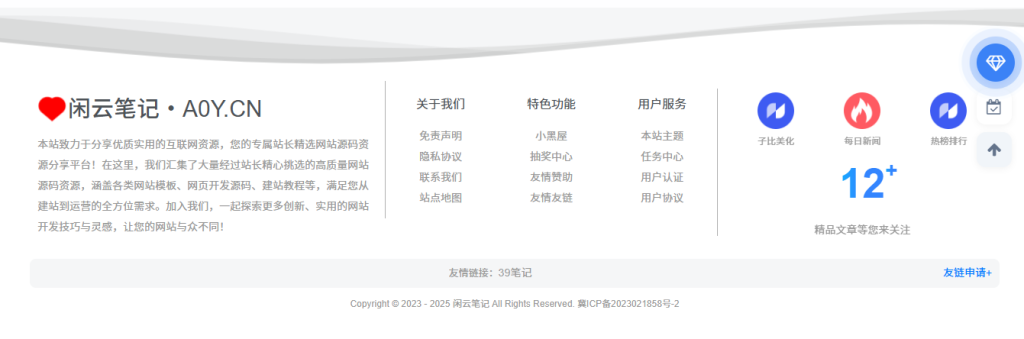
2.底部加群美化css
/*底部板块三图片border*/
.footer-miniimg p {

  position: relative;

}

.footer-miniimg p:hover {

  filter: contrast(1.1);

}

.footer-miniimg p:active {

  filter: contrast(0.9);

}

.footer-miniimg p::before,

.footer-miniimg p::after {

  content: "";

  border: 2px solid;

  border-image: linear-gradient(45deg, gold, deeppink) 1;

  position: absolute;

  top: -5px;

  left: -5px;

  right: -5px;

  bottom: -5px;

  animation: clippath 3s infinite;

}

.footer-miniimg p::before {

  animation: clippath 3s infinite -1.5s linear;

}

@keyframes clippath {

  0%,

  100% {

    clip-path: inset(0 0 96% 0);

    filter: hue-rotate(0deg);

  }

  25% {

    clip-path: inset(0 96% 0 0);

  }

  50% {

    clip-path: inset(96% 0 0 0);

    filter: hue-rotate(360deg);

  }

  75% {

    clip-path: inset(0 0 0 96%);

  }

}
3.右键复制美化css
/* 子比主题 - 自定义文字选中样式(无系统边框+蓝色文字+无额外边框) */
::selection {
    background: transparent !important; /* 去除选中时的背景色(无框选视觉) */
    color: #007bff !important; /* 选中文字设为蓝色(可替换#1677ff等子比主题蓝) */
    text-shadow: none !important; /* 去除文字阴影,避免边框感 */
}
::-moz-selection {
    /* 火狐浏览器兼容 */
    background: transparent !important;
    color: #007bff !important;
    text-shadow: none !important;
}

/* 若需禁止特定区域文字被框选,可添加以下类名控制 */
.no-select {
    user-select: none !important; /* 直接禁止文字被选中 */
    -webkit-user-select: none !important;
    -moz-user-select: none !important;
}
4.备案号彩色美化css
/*底部备案炫彩*/
.by-p {

        font-weight: 600;

        color: #8c888b;

        background: -webkit-linear-gradient(45deg, #70f7fe, #fbd7c6, #fdefac, #bfb5dd, #bed5f5);

        background: -moz-linear-gradient(45deg, #70f7fe, #fbd7c6, #fdefac, #bfb5dd, #bed5f5);

        background: -ms-linear-gradient(45deg, #70f7fe, #fbd7c6, #fdefac, #bfb5dd, #bed5f5);

        color: transparent;

        -webkit-background-clip: text;

        animation: ran 20s linear infinite;

    }

    @keyframes ran {

        from {

            background-position: 0;

        }

        to {

            background-position: 2000px 0;

        }
<a href="http://beian.miit.gov.cn/" rel="external nofollow" rel="external nofollow"><span class="by-p">这填写你的备案号</span></a>
5.打字彩色颗美化css
<!--彩色粒子特效-->

(function webpackUniversalModuleDefinition(a, b) {

    if (typeof exports === "object" && typeof module === "object") {

        module.exports = b()

    } else {

        if (typeof define === "function" && define.amd) {

            define([], b)

        } else {

            if (typeof exports === "object") {

                exports["POWERMODE"] = b()

            } else {

                a["POWERMODE"] = b()

            }

        }

    }

})(this, function() {

    return (function(a) {

        var b = {};


        function c(e) {

            if (b[e]) {

                return b[e].exports

            }

            var d = b[e] = {

                exports: {},

                id: e,

                loaded: false

            };

            a[e].call(d.exports, d, d.exports, c);

            d.loaded = true;

            return d.exports

        }

        c.m = a;

        c.c = b;

        c.p = "";

        return c(0)

    })([function(c, g, b) {

        var d = document.createElement("canvas");

        d.width = window.innerWidth;

        d.height = window.innerHeight;

        d.style.cssText = "position:fixed;top:0;left:0;pointer-events:none;z-index:999999";

        window.addEventListener("resize", function() {

            d.width = window.innerWidth;

            d.height = window.innerHeight

        });

        document.body.appendChild(d);

        var a = d.getContext("2d");

        var n = [];

        var j = 0;

        var k = 120;

        var f = k;

        var p = false;

        o.shake = true;


        function l(r, q) {

            return Math.random() * (q - r) + r

        }

        function m(r) {

            if (o.colorful) {

                var q = l(0, 360);

                return "hsla(" + l(q - 10, q + 10) + ", 100%, " + l(50, 80) + "%, " + 1 + ")"

            } else {

                return window.getComputedStyle(r).color

            }

        }

        function e() {

            var t = document.activeElement;

            var v;

            if (t.tagName === "TEXTAREA" || (t.tagName === "INPUT" && t.getAttribute("type") === "text")) {

                var u = b(1)(t, t.selectionStart);

                v = t.getBoundingClientRect();

                return {

                    x: u.left + v.left,

                    y: u.top + v.top,

                    color: m(t)

                }

            }

            var s = window.getSelection();

            if (s.rangeCount) {

                var q = s.getRangeAt(0);

                var r = q.startContainer;

                if (r.nodeType === document.TEXT_NODE) {

                    r = r.parentNode

                }

                v = q.getBoundingClientRect();

                return {

                    x: v.left,

                    y: v.top,

                    color: m(r)

                }

            }

            return {

                x: 0,

                y: 0,

                color: "transparent"

            }

        }

        function h(q, s, r) {

            return {

                x: q,

                y: s,

                alpha: 1,

                color: r,

                velocity: {

                    x: -1 + Math.random() * 2,

                    y: -3.5 + Math.random() * 2

                }

            }

        }

        function o() {

            var t = e();
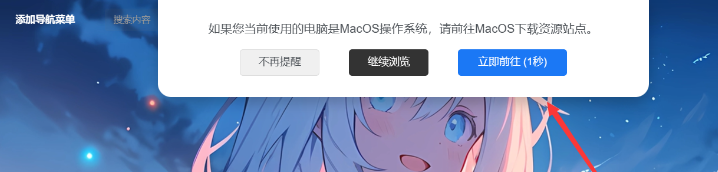
6.苹果设备提示弹窗 – 自定义CSS
/* 苹果设备提示弹窗 - 自定义CSS */
.apple-alert {
    position: fixed;
    top: 50%;
    left: 50%;
    transform: translate(-50%, -50%) scale(0.9);
    width: 90%;
    max-width: 450px;
    background: #ffffff;
    border-radius: 16px;
    box-shadow: 0 10px 30px rgba(0, 0, 0, 0.2);
    z-index: 10000;
    opacity: 0;
    transition: all 0.3s ease-out;
    font-family: -apple-system, BlinkMacSystemFont, 'Segoe UI', Roboto, Oxygen, sans-serif;
    overflow: hidden;
    pointer-events: none;
}

.apple-alert.active {
    opacity: 1;
    transform: translate(-50%, -50%) scale(1);
    pointer-events: auto;
}

.apple-alert-header {
    background: #1a73e8;
    color: white;
    padding: 22px 24px;
    display: flex;
    align-items: center;
}

.apple-alert-icon {
    font-size: 28px;
    margin-right: 16px;
    width: 40px;
    height: 40px;
    background: rgba(255, 255, 255, 0.2);
    border-radius: 50%;
    display: flex;
    align-items: center;
    justify-content: center;
}

.apple-alert-title {
    font-size: 1.3rem;
    font-weight: 600;
}

.apple-alert-content {
    padding: 28px 24px 20px;
    color: #202124;
    line-height: 1.6;
}

.apple-alert-text {
    margin-bottom: 18px;
    font-size: 1.05rem;
}

.apple-alert-actions {
    display: flex;
    flex-direction: column;
    padding: 10px 16px 20px;
}

.apple-alert-btn {
    font-family: inherit;
    font-weight: 600;
    font-size: 0.95rem;
    letter-spacing: 0.015em;
    padding: 14px 16px;
    border-radius: 8px;
    border: none;
    background: none;
    cursor: pointer;
    color: #1a73e8;
    transition: background-color 0.2s;
    text-align: center;
    width: 100%;
    margin-bottom: 12px;
}

.apple-alert-btn:hover {
    background-color: rgba(26, 115, 232, 0.08);
}

.apple-alert-btn:active {
    background-color: rgba(26, 115, 232, 0.16);
}

.apple-alert-btn.primary {
    background-color: #1a73e8;
    color: white;
}

.apple-alert-btn.primary:hover {
    background-color: #0d62c9;
}

.apple-alert-dont-show {
    display: flex;
    align-items: center;
    margin: 0 0 20px 0;
    padding: 12px 16px;
    background: rgba(26, 115, 232, 0.05);
    border-radius: 8px;
    font-size: 0.95rem;
    cursor: pointer;
}

.apple-alert-dont-show input {
    margin-right: 12px;
    width: 18px;
    height: 18px;
    cursor: pointer;
}

.apple-alert-backdrop {
    position: fixed;
    top: 0;
    left: 0;
    width: 100%;
    height: 100%;
    background-color: rgba(0, 0, 0, 0.5);
    z-index: 9999;
    opacity: 0;
    transition: opacity 0.3s ease-out;
    backdrop-filter: blur(4px);
    pointer-events: none;
}

.apple-alert-backdrop.active {
    opacity: 1;
    pointer-events: auto;
}
7.网站运行时间底部显示
安全运行:<span id=span_dt_dt style="color: #2F889A;"></span>
<script language=javascript>
function show_date_time(){
window.setTimeout("show_date_time()", 1000);
BirthDay=new Date("1/1/2025 1:1:1");
today=new Date();
timeold=(today.getTime()-BirthDay.getTime());
sectimeold=timeold/1000
secondsold=Math.floor(sectimeold);
msPerDay=24*60*60*1000
e_daysold=timeold/msPerDay
daysold=Math.floor(e_daysold);
e_hrsold=(e_daysold-daysold)*24;
hrsold=Math.floor(e_hrsold);
e_minsold=(e_hrsold-hrsold)*60;
minsold=Math.floor((e_hrsold-hrsold)*60);
seconds=Math.floor((e_minsold-minsold)*60);
span_dt_dt.innerHTML='<font style=color:#C40000>'+daysold+'</font> 天 <font style=color:#C40000>'+hrsold+'</font> 时 <font style=color:#C40000>'+minsold+'</font> 分 <font style=color:#C40000>'+seconds+'</font> 秒';
}
show_date_time();
</script>
8.脚页美化
第一版
<style>
.button-container {
  width: 100%;
  margin: 20px 0;
}

.button-row {
  display: flex;
  flex-wrap: wrap;
  justify-content: flex-start;
  gap: 8px;
  margin-bottom: 10px;
}

.button-first-row {
  width: 100%;
  display: flex;
  justify-content: flex-start;
  gap: 8px;
  margin-bottom: 8px;
}

.github-badge {
  display: flex;
  border-radius: 4px;
  font-size: 12px;
  color: #fff;
  line-height: 15px;
  background-color: #abbac3;
  overflow: hidden;
  text-shadow: none;
  box-shadow: 0 2px 4px rgba(0,0,0,0.1);
  transition: transform 0.2s ease;
}

.github-badge:hover {
  transform: translateY(-2px);
  box-shadow: 0 4px 8px rgba(0,0,0,0.15);
}

.github-badge .badge-subject {
  display: inline-block;
  background-color: #ffa500;
  padding: 4px 8px 4px 10px;
  font-weight: 600;
}

.github-badge a {
  display: inline-block;
  padding: 4px 10px;
  text-decoration: none;
  color: #fff !important;
  font-weight: 500;
}

.github-badge .bg-cai {
  background-image: linear-gradient(120deg, #3ca5f6, #a86af9);
}
.github-badge .bg-green {
  background-color: #3bca6e;
}
.github-badge .bg-blue {
  background-color: #007bff;
}
.github-badge .bg-orange {
  background-color: #ff7f50;
}
.github-badge .bg-red {
  background-color: #f55066;
}
.github-badge .bg-fen {
  background-color: #e76dcb;
}
.github-badge .bg-purple {
  background-color: #6a5acd;
}

@media (max-width: 768px) {
  .button-row,
  .button-first-row {
    justify-content: center;
  }
}
</style>

<div class="button-container">
  <div class="button-first-row">
    <div class="github-badge">
      <span class="badge-subject">网站托管于</span>
      <a class="bg-cai" href="(填写地址)aff/CNKVIIGL" rel="external nofollow" target="_blank">
        名称
      </a>
    </div>

    <div class="github-badge">
      <span class="badge-subject">网站主题为</span>
      <a class="bg-green" href="(填写地址)" rel="external nofollow" target="_blank">
        子比主题
      </a>
    </div>
  </div>

  <div class="button-row">

    <div class="github-badge">
      <a class="bg-orange" href="(填写地址)wp-sitemap.xml" rel="external nofollow" target="_blank">
        站点地图
      </a>
    </div>

    <div class="github-badge">
      <a class="bg-red" href="(填写地址)?page_id=3" rel="external nofollow" target="_blank">
        隐私声明
      </a>
    </div>

    <div class="github-badge">
      <a class="bg-fen" href="(填写地址)agreement" rel="external nofollow" target="_blank">
        用户协议
      </a>
    </div>

    <div class="github-badge">
      <a class="bg-purple" href="(填写地址)/267.html" rel="external nofollow" target="_blank">
        关于我们
      </a>
    </div>
  </div>
</div>
第二版
页面&显示–>>底部页脚–>>版块二,直接替换就行可以了!

<div class="github-badge">
  <span class="badge-subject bg-blue">
     <a href="/" target="_blank">友链申请</a>
  </span>
  <span class="badge-subject bg-brightgreen">
     <a href="/" target="_blank">免责声明</a>
  </span>
  <span class="badge-subject bg-orange">
     <a href="/" target="_blank">用户协议</a>
  </span>
  <span class="badge-subject bg-blueviolet">
     <a href="/" target="_blank">隐私声明</a>
  </span>
</div>

<style>
.github-badge {
  text-align: center;
  margin-bottom: 5px;
}

.badge-subject {
  -webkit-text-size-adjust: 100%;
  -webkit-tap-highlight-color: transparent;
  list-style: none;
  box-sizing: border-box;
  outline: 0 !important;
  font-family: "lovely", sans-serif;
  display: inline-block;
  border-radius: 4px;
  text-shadow: none;
  font-size: 12px;
  color: #fff;
  line-height: 15px;
  margin-bottom: 5px;
  margin-right: 8px;
  padding: 8px 16px;
  cursor: pointer;
  transition: all 0.3s ease;
}

.badge-subject:hover {
  transform: translateY(-2px);
  box-shadow: 0 4px 8px rgba(0, 0, 0, 0.2);
}

.bg-blue {
  background-color: #007bff;
}

.bg-brightgreen {
  background-color: #28a745;
}

.bg-orange {
  background-color: #fd7e14;
}

.bg-blueviolet {
  background-color: #6f42c1;
}

.badge-subject a {
  color: #fff !important;
  text-decoration: none;
  display: block;
  width: 100%;
  height: 100%;
}

.badge-subject a:hover {
  color: #fff !important;
}
</style>
9.复制自动带上文章标题和文章链接(JS代码)
document.addEventListener('copy', function(e) {
    const selection = window.getSelection();
    const selectedText = selection.toString();

    if (!selectedText) return;

    const postTitle = document.title;
    const postUrl = window.location.href;

    const copyright = '\n\n---\n文章标题:' + postTitle + '\n原文链接:' + postUrl + '\n转载请注明出处。';

    e.clipboardData.setData('text/plain', selectedText + copyright);
    e.preventDefault();
});
10.给你的网站添加帧率显示
// FPS 帧开始
$('body').before('<div id="fps" style="z-index:10000;position:fixed;top:3;left:3;font-weight:bold;"></div>');
var showFPS = (function(){
    var requestAnimationFrame =
        window.requestAnimationFrame ||
        window.webkitRequestAnimationFrame ||
        window.mozRequestAnimationFrame ||
        window.oRequestAnimationFrame ||
        window.msRequestAnimationFrame ||
        function(callback) {
            window.setTimeout(callback, 1000/60);
        };
    var e,pe,pid,fps,last,offset,step,appendFps;

    fps = 0;
    last = Date.now();
    step = function(){
        offset = Date.now() - last;
        fps += 1;
        if( offset >= 1000 ){
        last += offset;
        appendFps(fps);
        fps = 0;
        }
        requestAnimationFrame( step );
    };
    appendFps = function(fps){
        console.log(fps+'FPS');
        $('#fps').html(fps+'FPS');
    };
    step();
})();
// FPS 帧结束
11.给网站背景添加格子背景
CSS
body::before {
            background-image: linear-gradient(90deg, rgba(60, 10, 30, .04) 3%, transparent 0), linear-gradient(1turn, rgba(60, 10, 30, .04) 3%, transparent 0);
            background-size: 20px 20px;
            background-position: 50%;
            background-repeat: repeat;
}
12.手机左侧菜单添加图片
CSS
/*手机侧边栏背景图片*/
@media (max-width: 767px){
.mobile-navbar.show,.mobile-navbar.left{
    background-size: cover;
    background-repeat: no-repeat;
    background-position: center center;
    cursor: pointer;
  background-image:linear-gradient(rgba(255, 255,255,0),rgba(255,255,255, 0.3)),url(https://picshack.net/ib/7Lm5teUTyV.jpg);}
  .mobile-nav-widget .box-body {
    background: var(--muted-border-color) !important;}
}
13.自定义网站字体
@font-face{font-family: "lovely";src: url("字体链接") format("woff2");font-display: swap;}
*{font-family: "lovely"}
14.子比主题搜索框打字粒子特效
<!--彩色粒子特效-->
(function webpackUniversalModuleDefinition(a, b) {
    if (typeof exports === "object" && typeof module === "object") {
        module.exports = b()
    } else {
        if (typeof define === "function" && define.amd) {
            define([], b)
        } else {
            if (typeof exports === "object") {
                exports["POWERMODE"] = b()
            } else {
                a["POWERMODE"] = b()
            }
        }
    }
})(this, function() {
    return (function(a) {
        var b = {};

        function c(e) {
            if (b[e]) {
                return b[e].exports
            }
            var d = b[e] = {
                exports: {},
                id: e,
                loaded: false
            };
            a[e].call(d.exports, d, d.exports, c);
            d.loaded = true;
            return d.exports
        }
        c.m = a;
        c.c = b;
        c.p = "";
        return c(0)
    })([function(c, g, b) {
        var d = document.createElement("canvas");
        d.width = window.innerWidth;
        d.height = window.innerHeight;
        d.style.cssText = "position:fixed;top:0;left:0;pointer-events:none;z-index:999999";
        window.addEventListener("resize", function() {
            d.width = window.innerWidth;
            d.height = window.innerHeight
        });
        document.body.appendChild(d);
        var a = d.getContext("2d");
        var n = [];
        var j = 0;
        var k = 120;
        var f = k;
        var p = false;
        o.shake = true;

        function l(r, q) {
            return Math.random() * (q - r) + r
        }
        function m(r) {
            if (o.colorful) {
                var q = l(0, 360);
                return "hsla(" + l(q - 10, q + 10) + ", 100%, " + l(50, 80) + "%, " + 1 + ")"
            } else {
                return window.getComputedStyle(r).color
            }
        }
        function e() {
            var t = document.activeElement;
            var v;
            if (t.tagName === "TEXTAREA" || (t.tagName === "INPUT" && t.getAttribute("type") === "text")) {
                var u = b(1)(t, t.selectionStart);
                v = t.getBoundingClientRect();
                return {
                    x: u.left + v.left,
                    y: u.top + v.top,
                    color: m(t)
                }
            }
            var s = window.getSelection();
            if (s.rangeCount) {
                var q = s.getRangeAt(0);
                var r = q.startContainer;
                if (r.nodeType === document.TEXT_NODE) {
                    r = r.parentNode
                }
                v = q.getBoundingClientRect();
                return {
                    x: v.left,
                    y: v.top,
                    color: m(r)
                }
            }
            return {
                x: 0,
                y: 0,
                color: "transparent"
            }
        }
        function h(q, s, r) {
            return {
                x: q,
                y: s,
                alpha: 1,
                color: r,
                velocity: {
                    x: -1 + Math.random() * 2,
                    y: -3.5 + Math.random() * 2
                }
            }
        }
        function o() {
            var t = e();
            var s = 5 + Math.round(Math.random() * 10);
            while (s--) {
                n[j] = h(t.x, t.y, t.color);
                j = (j + 1) % 500
            }
            f = k;
            if (!p) {
                requestAnimationFrame(i)
            }
            if (o.shake) {
                var r = 1 + 2 * Math.random();
                var q = r * (Math.random() > 0.5 ? -1 : 1);
                var u = r * (Math.random() > 0.5 ? -1 : 1);
                document.body.style.marginLeft = q + "px";
                document.body.style.marginTop = u + "px";
                setTimeout(function() {
                    document.body.style.marginLeft = "";
                    document.body.style.marginTop = ""
                }, 75)
            }
        }
        o.colorful = false;

        function i() {
            if (f > 0) {
                requestAnimationFrame(i);
                f--;
                p = true
            } else {
                p = false
            }
            a.clearRect(0, 0, d.width, d.height);
            for (var q = 0; q < n.length; ++q) {
                var r = n[q];
                if (r.alpha <= 0.1) {
                    continue
                }
                r.velocity.y += 0.075;
                r.x += r.velocity.x;
                r.y += r.velocity.y;
                r.alpha *= 0.96;
                a.globalAlpha = r.alpha;
                a.fillStyle = r.color;
                a.fillRect(Math.round(r.x - 1.5), Math.round(r.y - 1.5), 3, 3)
            }
        }
        requestAnimationFrame(i);
        c.exports = o
    }, function(b, a) {
        (function() {
            var d = ["direction", "boxSizing", "width", "height", "overflowX", "overflowY", "borderTopWidth", "borderRightWidth", "borderBottomWidth", "borderLeftWidth", "borderStyle", "paddingTop", "paddingRight", "paddingBottom", "paddingLeft", "fontStyle", "fontVariant", "fontWeight", "fontStretch", "fontSize", "fontSizeAdjust", "lineHeight", "fontFamily", "textAlign", "textTransform", "textIndent", "textDecoration", "letterSpacing", "wordSpacing", "tabSize", "MozTabSize"];
            var e = window.mozInnerScreenX != null;

            function c(k, l, o) {
                var h = o && o.debug || false;
                if (h) {
                    var i = document.querySelector("#input-textarea-caret-position-mirror-div");
                    if (i) {
                        i.parentNode.removeChild(i)
                    }
                }
                var f = document.createElement("div");
                f.id = "input-textarea-caret-position-mirror-div";
                document.body.appendChild(f);
                var g = f.style;
                var j = window.getComputedStyle ? getComputedStyle(k) : k.currentStyle;
                g.whiteSpace = "pre-wrap";
                if (k.nodeName !== "INPUT") {
                    g.wordWrap = "break-word"
                }
                g.position = "absolute";
                if (!h) {
                    g.visibility = "hidden"
                }
                d.forEach(function(p) {
                    g[p] = j[p]
                });
                if (e) {
                    if (k.scrollHeight > parseInt(j.height)) {
                        g.overflowY = "scroll"
                    }
                } else {
                    g.overflow = "hidden"
                }
                f.textContent = k.value.substring(0, l);
                if (k.nodeName === "INPUT") {
                    f.textContent = f.textContent.replace(/\s/g, "\u00a0")
                }
                var n = document.createElement("span");
                n.textContent = k.value.substring(l) || ".";
                f.appendChild(n);
                var m = {
                    top: n.offsetTop + parseInt(j["borderTopWidth"]),
                    left: n.offsetLeft + parseInt(j["borderLeftWidth"])
                };
                if (h) {
                    n.style.backgroundColor = "#aaa"
                } else {
                    document.body.removeChild(f)
                }
                return m
            }
            if (typeof b != "undefined" && typeof b.exports != "undefined") {
                b.exports = c
            } else {
                window.getCaretCoordinates = c
            }
        }())
    }])
});
POWERMODE.colorful = true;
POWERMODE.shake = false;
document.body.addEventListener("input", POWERMODE);
<!--彩色粒子特效结束-->
15.Golink跳转新标签页下载
两种 JS 代码选择一个粘贴到 子比主题设置 - 全局功能 - 自定义代码 - 自定义javascript代码
document.addEventListener('DOMContentLoaded', () => {
    document.querySelectorAll('a[href*="?golink="]').forEach(link => {
        link.target = '_blank';
    });
});
window.onload = function() {
    var links = document.getElementsByTagName('a');
    for (var i = 0; i < links.length; i++) {
        if (links[i].href.includes('?golink=')) {
            links[i].setAttribute('target', '_blank');
        }
    }
};
16.隐藏文章底部分类和标签
CSS代码
/* 隐藏文章底部分类和标签 */
.article-tags{
    display:none;
}
/* 隐藏文章底部分类和标签 */
17.列表Mini版缩略图
css代码
/* 列表Mini版缩略图 */
.posts-item .item-thumbnail {
    width: 150px;
}
/* 列表Mini版缩略图 */
18.文章图片圆角
css代码
/* 文章图片圆角 */
.wp-posts-content img {border-radius: 13px};
/* 文章图片圆角 */
19.禁止拖动网站图片
css代码
/* 禁止拖动网站图片 */
   img {-webkit-user-drag: none;
        -webkit-user-select: none;
        -moz-user-select: none;
        -ms-user-select: none;
        user-select: none;}
/* 禁止拖动网站图片 */
20.昵称抖音故障风格
css代码
/* 昵称抖音故障风格 */
.display-name {
    text-shadow: -2px 0 rgba(0, 255, 255, .5), 2px 0 rgba(255, 0, 0, .5);
    animation: shake-it .5s reverse infinite cubic-bezier(0.68, -0.55, 0.27, 1.55);}

@keyframes shake-it {
    0% {text-shadow: 0 0 rgba(0, 255, 255, .5), 0 0 rgba(255, 0, 0, .5);}
    25% {text-shadow: -2px 0 rgba(0, 255, 255, .5), 2px 0 rgba(255, 0, 0, .5);}
    50% {text-shadow: -5px 0 rgba(0, 255, 255, .5), 3px 0 rgba(255, 0, 0, .5);}
    100% {text-shadow: 3px 0 rgba(0, 255, 255, .5), 5px 0 rgba(255, 0, 0, .5);}}
/* 昵称抖音故障风格 */
21.昵称流彩字体风格
css代码
/* 昵称流彩字体效果 */
.display-name {
    background-image: -webkit-linear-gradient(90deg, #07c160, #fb6bea 25%, #3aedff 50%, #fb6bea 75%, #28d079);
    -webkit-text-fill-color: transparent;
    -webkit-background-clip: text;
    background-size: 100% 600%;
    animation: wzw 10s linear infinite;}

@keyframes wzw {
    0% {background-position: 0 0;}
    100% {background-position: 0 -300%;}}
/* 昵称流彩字体效果 */
22.文章标题渐变彩色文字
css代码
/* 文章标题渐变彩色文字 */
.pink {background-color: #777777 !important;}

@media screen and (min-width: 680px) {
    .joe_div {
        background: url(你的图片) right 10px bottom 10px no-repeat;
        background-size: 12%;}}

.joe_div {
    color: #989898;
    word-break: break-all;
    line-height: 25px;
    border-radius: 10px;
    border: 1px solid #777777;
    padding: 28px 14px 14px 14px;}

.item-heading :hover,
.text-ellipsis :hover,
.text-ellipsis-2 :hover,
.links-lists :hover {
    background-image: -webkit-linear-gradient(30deg, #32c5ff 25%, #b620e0 50%, #f7b500 75%, #20e050 100%);
    -webkit-text-fill-color: transparent;
    -webkit-background-clip: text;
    -webkit-background-size: 200% 100%;
    -webkit-animation: maskedAnimation 4s infinite linear;}

@keyframes maskedAnimation {
    0% {background-position: 0 0}
    100% {background-position: -100% 0}}
/* 文章标题渐变彩色文字 */
23.文章缩略图添加动态图标
css代码
/* 文章缩略图动态图标 */
.item-thumbnail:before {
    content: '';
    position: absolute;
    top: 0;
    left: 0;
    right: 0;
    bottom: 0;
    background: rgba(0, 0, 0, 0);
    transition: background .35s;
    border-radius: 8px;
    z-index: 2;
    max-width: 765px;
    margin: 0 auto;
    pointer-events: none;}

.item-thumbnail:after {
    content: '';
    position: absolute;
    top: 50%;
    left: 50%;
    width: 50px;
    height: 50px;
    margin: -25px 0 0 -25px;
    background: url(图标链接);
    background-repeat: no-repeat;
    background-size: 100% 100%;
    z-index: 3;
    -webkit-transform: scale(2);
    transform: scale(2);
    transition: opacity .35s, -webkit-transform .35s;
    transition: transform .35s, opacity .35s;
    transition: transform .35s, opacity .35s, -webkit-transform .35s;
    opacity: 0;
    pointer-events: none;}

.item-thumbnail:hover:before {
    background: rgba(0, 0, 0, .5)}

.item-thumbnail:hover:after {
    -webkit-transform: scale(1);
    transform: scale(1);
    opacity: 1}
/* 文章缩略图动态图标 */
24.文章中自动添加关键词链接,协助收录内页优化
将下面的 PHP 代码加入到主题目录下:themes/zibll/functions.php 文件中。
// 文章添加关键词链接开始
function wpkj_auto_add_tag_link($content){
$limit = 1; // 设置同一个标签添加几次链接
$posttags = get_the_tags();
if ($posttags) {
foreach($posttags as $tag) {
$link = get_tag_link($tag->term_id);
$keyword = $tag->name;
$cleankeyword = stripslashes($keyword);
$url = '<a target="_blank" href="'.$link.'" title="'.str_replace('%s', addcslashes($cleankeyword, '$'), __('View all posts in %s')).'">'.addcslashes($cleankeyword, '$').'</a>';
$regEx = '\'(?!((<.*?)|(<a.*?)))('. $cleankeyword . ')(?!(([^<>]*?)>)|([^>]*?</a>))\'s';
$content = preg_replace($regEx,$url,$content,$limit);
}
}
return $content;
}
add_filter( 'the_content', 'wpkj_auto_add_tag_link', 1 );
// 文章添加关键词链接结束
25.友链图片圆角样式
/*友链头像圆角*/
.link-only-img img{border-radius: var(--main-radius);}
.link-img img{border-radius: var(--main-radius);}
26.评论框添加背景图片
CSS
/*评论背景图*/
textarea#comment {background-color:transparent;background:linear-gradient(rgba(0, 0, 0, 0.05), rgba(0, 0, 0, 0.05)),url(https://img.godgy.xyz/phbed/2022/10/07/63402cfc7f71a.png) right 10px bottom 10px no-repeat;-moz-transition:ease-in-out 0.45s;-webkit-transition:ease-in-out 0.45s;-o-transition:ease-in-out 0.45s;-ms-transition:ease-in-out 0.45s;transition:ease-in-out 0.45s;}
textarea#comment:focus {background-position-y:789px;-moz-transition:ease-in-out 0.45s;-webkit-transition:ease-in-out 0.45s;-o-transition:ease-in-out 0.45s;-ms-transition:ease-in-out 0.45s;transition:ease-in-out 0.45s;}
27.网站侧边栏添加新年倒计时小工具
HTML
<div class="gn_box">
    <h2><center><font color=#E80017>2</font><font color=#D1002E>0</font><font color=#BA0045>2</font><font color=#A3005C>2</font><font
            color=#8C0073>年</font><font color=#75008A>-</font><font color=#5E00A1>新</font><font
            color=#4700B8>年</font><font color=#3000CF>倒</font><font color=#1900E6>计</font><font color=#0200FD>时</font>
    </center></h2>
    <center>
        <div id="CountMsg" class="HotDate">
            <span id="t_d"></span>
            <span id="t_h"></span>
            <span id="t_m"></span>
            <span id="t_s"></span>
        </div>
    </center>
    <script type="text/javascript"> function getRTime() {
        var EndTime = new Date('2022/01/01 00:00:00');
        var NowTime = new Date();
        var t = EndTime.getTime() - NowTime.getTime();
        var d = Math.floor(t / 1000 / 60 / 60 / 24);
        var h = Math.floor(t / 1000 / 60 / 60 % 24);
        var m = Math.floor(t / 1000 / 60 % 60);
        var s = Math.floor(t / 1000 % 60);
        document.getElementById("t_d").innerHTML = d + " 天";
        document.getElementById("t_h").innerHTML = h + " 时";
        document.getElementById("t_m").innerHTML = m + " 分";
        document.getElementById("t_s").innerHTML = s + " 秒";
    }
    setInterval(getRTime, 1000);
    </script>
</div>
28.底部炫酷小卡片
HTML
<div id="wiiuii" style="box-shadow: 0 0 10px var(--main-shadow);">
<section class="buy-container">
  <div class="buy-box">
    <div class="slogan">
      <h3>闲云笔记</h3>
      <p>欢迎光临小站!</p>
    </div>
    <ul class="actions">
      <li>
        <a href="http://wpa.qq.com/msgrd?v=3&uin=88888888&site=qq&menu=yes" target="_blank" class="buy-button primary" rel="noopener noreferrer">联系站长</a>
      </li>
      <li>
        <a href="https://www.a0y.cn/links" target="_blank" class="demo-button" rel="noopener noreferrer">友链通道</a>
      </li>
    </ul>
  </div>
  <span class="tips"><div id="go-fav">更多精彩文章,按<span>Ctrl</span>+<span>D</span>收藏本站!</div></span>
  </section>
  </div>
<style type="text/css">
.buy-container{color: #ccc; padding: 60px 40px 50px 40px;margin: 0 auto; background: rgb(224,32,140); /*下述两行代码为兼容浏览器用,建议同步修改,亦可删除(不建议)*/background: -moz-linear-gradient(left, rgb(160,32,240) 0%, rgb(0,191,255) 100%);background: -webkit-linear-gradient(left, rgb(160,32,240) 0%,rgb(0,191,255) 100%); /*请更改此行代码,颜色为rgb模式*/background: linear-gradient(to right, rgb(160,32,240) 0%, rgb(0,191,255) 100%);filter: progid:DXImageTransform.Microsoft.gradient( startColorstr='#e0208c', endColorstr='#fa6400',GradientType=1 );/*-webkit-border-radius: 8px;-moz-border-radius: 8px;-o-border-radius: 8px;border-radius: 8px;*/border-radius: var(--main-radius);}.buy-container .buy-box{display: -webkit-box; display: flex; -webkit-box-pack: justify; justify-content: space-between; -webkit-box-align: center; align-items: center; max-width: 900px; margin: 0 auto;}@media screen and (max-width: 700px){.buy-container .buy-box{display: block; text-align: center;}.buy-container .buy-box .slogan{margin-bottom: 30px;}}.buy-container .buy-box .slogan h3{color: #fff;font-size: 26px;margin: 0 0 10px 0;}@media screen and (max-width: 800px){.buy-container .buy-box .slogan h3{font-size: 24px;}}@media screen and (max-width: 500px){.buy-container .buy-box .slogan h3{font-size: 20px;}}@media screen and (max-width: 400px){.buy-container .buy-box .slogan h3{font-size: 18px;}}.buy-container .buy-box .slogan p{color: #fff;font-size: 14px;font-weight: bold;margin: 10px 0;}.buy-container .buy-box .actions{display: -webkit-box; display: flex; -webkit-box-align: center; align-items: center;list-style-type: none;margin: 0;padding: 0;}@media screen and (max-width: 700px){.buy-container .buy-box .actions{-webkit-box-pack: justify; justify-content: center;}}.buy-container .buy-box .actions li{margin: 0;}.buy-container .buy-box .actions li:last-child{margin-left: 10px;}.buy-container .buy-box .actions li a{position: relative;color: #fff !important;font-size: 14px;font-weight: bold; line-height: 1;text-decoration: none;padding: 10px 20px;background-color: rgba(255, 255, 255, .1);-webkit-border-radius: 4px;-moz-border-radius: 4px;-o-border-radius: 4px;border-radius: 4px;-webkit-transition: .2s;-moz-transition: .2s;-o-transition: .2s;transition: .2s;}.buy-container .buy-box .actions li a:hover{-webkit-transform: translateY(-2px);-moz-transform: translateY(-2px);-o-transform: translateY(-2px);transform: translateY(-2px); -webkit-box-shadow: 0 5px 10px 0 rgba(0, 0, 0, .2); -moz-box-shadow: 0 5px 10px 0 rgba(0, 0, 0, .2); -o-box-shadow: 0 5px 10px 0 rgba(0, 0, 0, .2); box-shadow: 0 5px 10px 0 rgba(0, 0, 0, .2);opacity: 1 !important;}@media screen and (max-width: 330px){.buy-container .buy-box .actions li a{font-size: 12px;}}.buy-container .buy-box .actions li a:not(.primary):before{content: "";position: absolute;top: 0;left: 0;width: 100%;height: 100%;-webkit-box-shadow: inset 0 0 0 1px currentColor;-moz-box-shadow: inset 0 0 0 1px currentColor;-o-box-shadow: inset 0 0 0 1px currentColor;box-shadow: inset 0 0 0 1px currentColor;-webkit-border-radius: 4px;-moz-border-radius: 4px;-o-border-radius: 4px;border-radius: 4px;-khtml-opacity: .3;-moz-opacity: .3;opacity: .3;}.buy-container .buy-box .actions li a:after{display: none;}.buy-container .buy-box .actions li a.primary{color: #ff3b30 !important;background-color: #fff;}.buy-container .tips{border-top: 1px solid rgba(255, 255, 255, .1);display: block;color: #fff;font-size: 12px;text-align: center; max-width: 900px;margin: 30px auto 0 auto;padding-top: 30px;}@media screen and (max-width: 768px){.buy-container {padding: 30px 40px 30px 40px;}}#go-fav{width:100%; height:100%; line-height:30px; text-align:center; font-size:14px; font-weight:700; color:rgba(255, 255, 255, 1);}#go-fav span{padding:5px 10px; background:#f0e7e2; border-radius:8px; color:#202020; margin:0 5px;}
</style>
<script>
document.getElementById("wiiuii").parentNode.parentNode.style.padding=0;
</script>
29.公告弹窗样式美化
HTML
<html>
    <body>
<!--文本-->
<a href="https://www.a0y.cn/" target="_blank"  title="闲云笔记">
    <img style="display: inline-block; width: 100%; max-width: 100%; height: auto;border-radius: 10px;-webkit-border-radius: 10px;-moz-border-radius: 10px;" src="https://www.a0y.cn/">
</a>
        <div class="text_body" style="padding-bottom: 30px;">
            <div class="text" id="container" style="font-weight:bold;">
                欢迎光临寒舍!还在使用本站《子比主题添加底部统计信息模块小工具》文章中修改版的小伙伴,出现“用户总数”不显示的,请更新一下PHP代码,我已经更新PHP代码在文章中了。另外所有教程的图片链接,请自行下载上传到本地或者上传其他图床,谢谢啦。
            </div>
        </div>
<!--文本结束-->
<script type="text/javascript">
var text = $("#container").text().trim();
        $("#container").html("");
        for(var i = 0;i < text.length;i++){
            $("#container").append("<span>"+text[i]+"</span>")
        }
        var s = 0;
        var tim = setInterval(function(){
            $("#container span").eq(s++).css("color",getColor()).show();
            if(s == text.length){
                clearInterval(tim)
            }
        }, 100)
        function getColor(){
            return "rgb("+Math.floor(Math.random()*255)+","+Math.floor(Math.random()*255)+","+Math.floor(Math.random()*255)+")";
        }
        </script>
    </body>
</html>
30.添加底部蓝色波浪
HTML
<!--底部波浪开始-->
<div class="wiiuii_layout">
<svg class="editorial"
     xmlns="http://www.w3.org/2000/svg"
     xmlns:xlink="http://www.w3.org/1999/xlink"
     viewBox="0 24 150 28"
     preserveAspectRatio="none">
 <defs>
 <path id="gentle-wave"
 d="M-160 44c30 0
    58-18 88-18s
    58 18 88 18
    58-18 88-18
    58 18 88 18
    v44h-352z" />
  </defs>
  <g class="parallax">
   <use xlink:href="#gentle-wave" x="50" y="0" fill="#4579e2"/>
   <use xlink:href="#gentle-wave" x="50" y="3" fill="#3461c1"/>
   <use xlink:href="#gentle-wave" x="50" y="6" fill="#2d55aa"/>
  </g>
</svg>
</div>
<style type='text/css'>
.parallax > use{animation: move-forever 12s linear infinite;}.parallax > use:nth-child(1){animation-delay: -2s;}.parallax > use:nth-child(2){animation-delay: -2s; animation-duration: 5s;}.parallax > use:nth-child(3){animation-delay: -4s; animation-duration: 3s;}@keyframes move-forever{0%{transform: translate(-90px, 0%);} 100%{transform: translate(85px, 0%);}}.wiiuii_layout{width: 100%;height: 40px;position: relative;overflow: hidden;z-index: 1;background: var(--footer-bg);}.editorial{display: block; width: 100%; height: 40px; margin: 0;}
</style>
<!--底部波浪结束-->
© 版权声明
NOTICE
xianyunbiji@foxmail.com | Copyright © 2023~2026
01
DISCLAIMER
本站资源大多来自网络,如有侵犯权益请联系管理员,我们会第一时间审核删除。站内资源仅供学习测试,未经许可禁止商用,请在24小时内删除。
02
VIP PRIVILEGE
遇到付费内容?升级终身VIP即可全站免费畅享所有资源,可以联系我的微信进行开通。
你的群名:闲云笔记
THE END









暂无评论内容